Guides
How to Take Payments for a Class or Workshop on WhatsApp and Track Who Paid
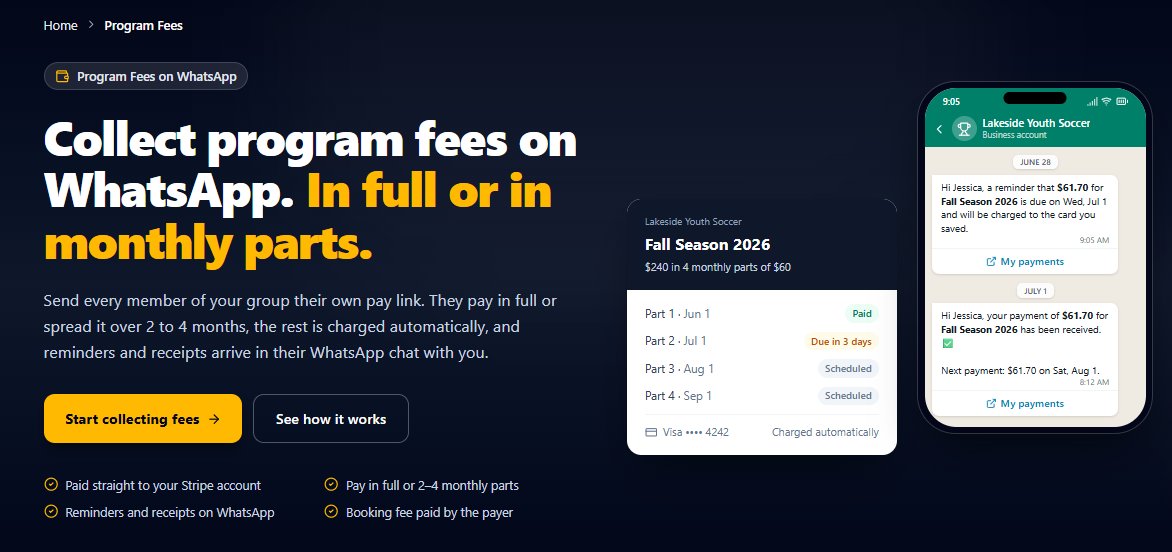
One payment link, receipts in the same chat, a clear list of who's paid, and payment questions answered before you even see them.
By MsgOrb
You run a six-week pottery course, or a Saturday yoga workshop, or a beginner's coding class. Enrollment is going well—but the admin is eating your week. One person paid in cash, another says they paid but you can't find it, a third asks "how much is it again?" for the fourth time, and someone else wants to know when their next installment is due. You're a teacher, not a collections department.
By the time the first session starts, you've spent more hours chasing payments than planning the class.
Why the usual way breaks
When you take payments by bank transfer, cash, or a link you paste into a chat one person at a time, nothing adds up in one place. You have a spreadsheet with names, a banking app with amounts, and a phone full of messages asking whether payment went through. Matching them means scrolling back through weeks of chat.
Installments make it worse. Someone pays the first part, then the second, and you're keeping track of who's on which payment in your head. A single missed payment can slip through until the end of the course.
What you need is one payment link that fills in the details for each person, a receipt they get straight away, and a list that shows who has paid and what's next. That's what MsgOrb does on WhatsApp.
How to do it with MsgOrb on WhatsApp
Set the class up once in Program Fees, and the payments, receipts and answers run from there. Here's how it works.
- Connect Stripe on the Tickets page. You only do this once. Card payments are processed by Stripe and paid into your own Stripe account—MsgOrb never holds the money.
- In Program Fees, click New program. This is where the whole class lives: the schedule, the price and the list of who's enrolled.
- Add the name, the dates, and when it meets. This is the information people need before they pay.
- Add the places—how many spots the class has. This keeps the group manageable and tells you when you're full.
- Set the price, and choose pay in full or up to 4 monthly parts if you're letting people spread the cost. Installments are tracked for you, so you're not the one remembering who's due what.
- Add optional questions if you need them—for example, a skill level, a dietary need or a preferred session. These show up with the person's record.
- Send it out. Use Send to group if you already have the class's contact list, or Share on WhatsApp, Copy link or the QR code for flier for new people who haven't signed up yet.
- Anyone who pays joins the class's group. That means the enrolled list builds itself as people pay, with no spreadsheet to update by hand.
- Open the People tab to see everyone, what they paid and their next payment. This is your one clear view of the whole class.
The booking fee is 2% + $0.50 per payment, paid by the payer on top, so you receive the full class price.
What your students receive
Each person gets a private WhatsApp message with their own payment link—their name and number already filled in—and a receipt the moment they pay. When they ask a question later, MsgOrb answers from their own payment record, in your words, in the same chat.
Imagine a student named Priya who paid the first of four installments. She messages your number: "Did my payment go through?" She gets this back:
"Hi Priya, yes—your first payment for the Saturday pottery course has gone through, and your receipt is above. Your next payment is due on the 15th. Tap below if you'd like to pay it now."
The same automatic answer covers the common questions: "when is my next payment?", "send me the link," and "how much is it?" Each reply comes from the person's own record, so it's always right for them.
What changes for you
The spreadsheet goes away. The People tab is the whole picture: who's enrolled, what each person has paid, and which payment is next. When someone asks "did my payment go through?", the answer is already on its way—answered from their own record, not from you scrolling back through weeks of chat.
Installments stop being a mental load. MsgOrb tracks each part, so you see who's on schedule and who's behind, without keeping a running tally in your head.
Enrollment fills itself. Every person who pays joins the class's group, so your roster grows as the money comes in, and the group and the paid list never drift apart.
And you get your prep time back. The routine payment questions are handled, so the messages that reach you are the ones that need a person.
Try it
If running a class means chasing payments and answering the same money questions all week, MsgOrb gives you one payment link, receipts in the chat, and a clear list of who's paid. Set up your next class and see how it feels. Start free.
Start free at www.msgorb.com- Class & Workshop Payments on WhatsApp | MsgOrb
- Take payments for a class or workshop on WhatsApp. Send payment links, deliver receipts, and see who paid and who's due next. Start free.
- class-workshop-payments-whatsapp
- The Program Fees People tab for a class, showing each student, what they've paid, and their next payment.