Church Communication Guide
Sell Event Tickets on WhatsApp With QR Check-In
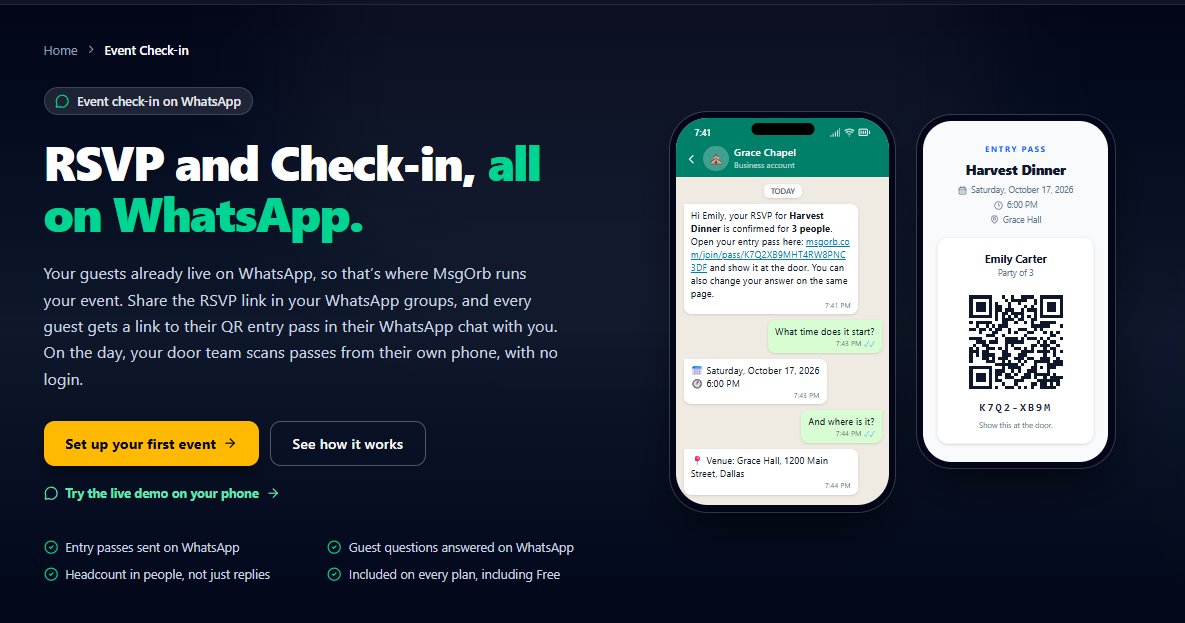
Friday Night at the Front Table
Imagine you are standing by the front entrance of your venue twenty minutes before the doors open. A line of forty people is already curling down the sidewalk, and your volunteer is squinting at a printed spreadsheet trying to match names to bank transfers from three weeks ago. Meanwhile, your phone is buzzing in your pocket with texts from guests asking if their payment went through and what they need to show at the door. Instead of welcoming your speakers or checking the sound, you are playing detective with screenshots of receipts.
Why the Usual Way Breaks Down
When you organize a paid dinner, community fundraiser, or weekend workshop, selling the tickets is only half the battle. The real headache starts when payments, guest names, and door lists live in three different places.
If you post a payment link in a group chat, people pay under a spouse's name or forget to write who the tickets are for. You end up scrolling through dozens of messages, copying names into a spreadsheet, and texting people one by one to confirm you got their money. Then, when guests buy multiple tickets for friends, your spreadsheet lists one buyer and three mystery guests.
By the time the night of the event arrives, your paper list is already out of date. Someone bought a ticket ten minutes ago while walking from the parking lot, and the person holding the clipboard at the door has no idea. Or worse, three people show up claiming the same group reservation, and nobody wants to hold up the line to sort it out.
How to Run Ticket Sales and Entry on WhatsApp With MsgOrb
With MsgOrb, your ticket sales, guest payments, and entry passes all run through one connected flow—and the ticket lands right in your guest's WhatsApp chat, where they will never lose it. Here is how you set it up from start to finish:
- Connect your payment account: In your MsgOrb dashboard, open Tickets, choose your country, and click Connect Stripe. You only have to do this once. Every card payment your guests make is processed by Stripe and paid directly into your own Stripe account.
- Start your event: Click New paid event. Type in your event's name, date, start time, venue, and description. You can upload a flier image so guests recognize the event right away, and set the most tickets one person can book in a single order.
- Set your ticket prices: If everyone pays the same amount, simply type a price per person. If you need different tiers, click Add price options to create up to 5 ticket types. For example, you might set up Member $20, Non-member $30, or an Early bird price with an "Until" date so the discount closes on its own.
- Add optional registration questions: If you need to ask anything when people buy their tickets, you can include optional registration questions right on the form before moving on.
- Create and share your event: Click Create event. Right away, MsgOrb gives you two ways to get the word out: click Share on WhatsApp to send the booking link out, or click QR code for flier to download a code you can drop onto posters, bulletins, or social graphics.
- Let guests book and pay in seconds: When a guest taps your link or scans your flier, they type their name and WhatsApp number (every phone number field has a country picker, so numbers are saved correctly). They choose how many tickets they want, see the clear breakdown of the ticket price, booking fee, and total, and pay by card with Stripe.
- Send the QR pass automatically on WhatsApp: The moment the payment goes through, MsgOrb sends a private message to that guest on WhatsApp from your own WhatsApp Business number. It includes their first name and their ticket pass with a QR code. (Messages to people who haven't messaged you in the last 24 hours use a message template that Meta approves first, usually within 15 to 30 minutes.)
- Manage your event from four simple tabs: Back in MsgOrb, your event page is organized into four tabs: Overview, Registrations, Edit details & prices, and On the day. You can check Overview for a quick snapshot, open Registrations to see everyone who bought tickets, or use Edit details & prices if you need to adjust your event info. If someone needs their money back, refunds are done directly in Stripe.
- Check guests in at the door: When event day arrives, open the On the day tab. Here you will find your automatic reminders and the door check-in link. Share that link with the staff or volunteers working the entrance. They open it on their own phones and scan each guest's WhatsApp QR code as they walk in—no app to install and no paper lists to cross off.
What Your Guests Receive on WhatsApp
Because the pass goes straight to each guest privately on WhatsApp—not into a noisy group chat—they don't have to dig through spam folders or print anything out at home. Right after paying, they see a message like this on their phone:
Hi Marcus! You're all set for the Annual Community Gala on Saturday, November 14 at 6:30 PM at The Foundry Hall.
Tickets: 2 (Member)
Total paid: $40.00
Here is your entry pass with your QR code. Just open this chat at the door so our team can scan you right in. See you there!
When Marcus arrives at the venue, he already has WhatsApp on his home screen. He opens the chat, holds up the QR code, gets scanned in two seconds, and walks right in.
What Changes for You
When ticket buying and door check-in live in the same flow, your whole week leading up to the event feels different.
You stop chasing people for payments because nobody gets a ticket pass until they pay with Stripe. You don't have to wonder if your early bird discount is still active at midnight, because the "Until" date handles the cutoff for you. And whenever a committee member asks how ticket sales are going, you just tap Overview or Registrations instead of tallying numbers on a calculator.
Best of all, the front door stays calm. Even if five people buy tickets from their cars five minutes before the start time, their passes arrive on WhatsApp immediately and your door link recognizes their QR codes the second they walk up. You get to spend the first half hour of your event actually talking to your guests instead of staring at a clipboard.
✅ One flow, zero chaos: Stripe payments → automatic WhatsApp QR passes → door check‑in link for your team. No spreadsheets, no lost tickets, no “did my payment go through?” texts.
Ready to Run Your Next Paid Event on WhatsApp?
You can set up your event dashboard, connect your WhatsApp Business number, and start exploring MsgOrb on the free plan today. Visit www.msgorb.com to create your free account and see how easy your next ticketed event can be.